Fashion

Showing posts with label Web Page. Show all posts

Sunday, 13 November 2016

How to change background color of main boy

Background color for body of webpage.

If you want to change your webpage background color
By extending <BODY> tag
As below

<html>
<head>
<title>
Background color of page body
</title>
</head>
<body  bgcolor= “green”>
Page with green color
</body>
<html>


You can take color code also that’s you will get from Photoshop colors

Or just right

On google and search it’s will produce all html codes for you
Then you can picked color code and paste on bgcolor.

After changed background color.


Thursday, 10 November 2016

How to create WebPage Body


Now our web page needs a body where we will puts all our contents . 
So for body we will use these tags.
<body> Contents </body>

Now Write this code on notepad  or
You can also watch video about web page body which are above this post as a name
Of web page body.
Body will come right after header end tag.
<html>
<head>
<title> Web Page Body</title>
</head>
<body> Our contents goes here………</body>
</html>

Like this on notepad

Then save it as a name of “page_body.html” in your  folder
Or on desktop.


It will show result on browser like this.


Sunday, 6 November 2016

How to create website title in html urdu/hindi/english

How To Create Web Page TITLE


        One of the most important part of the header is title.
       Title contains small text which will appear in the title bar of the browser.
       Below are the title html codes.


<html>
<head>
<title> well come to my website </title>
</head>
</html>

Title codes must be write between the header cod just like shown above.

It will sow like this in your browser.


It's will look like this in Browser.


Tuesday, 1 November 2016

Page Header


 Every web site must have header. Header contain important information about website.
It's mean header define actually about what your website.
Header area in website will defined in HTML by <head> and </head> tags.
<head> it's opening tag and </head> it's closing tag.
We will define HEADER information between <head> and </head> tags.

Example :-


Then save it like go to file click on "save as" then right file name whatever you want.
for example "page_header.html".
After saved your file in specific folder go to inside the folder and click on file that you have save as file name "page_header.html".
But it will take you on google chrome but will not show anything because there should be defined something more under tag.
That tags i will define in another post.
But if you like this post then please give a comment and like our posts.
So that we can know that we are really helping someone

Monday, 31 October 2016

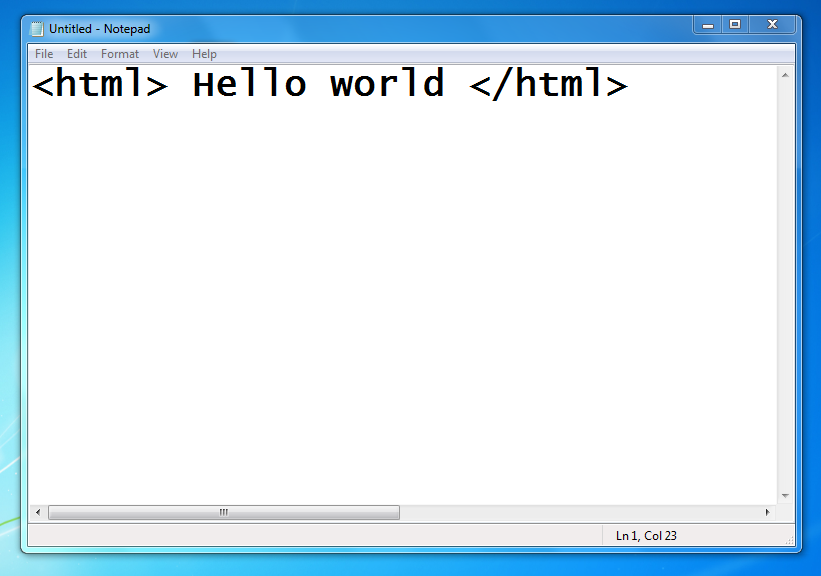
Start Here first webpage.

Now open your notepad or html text editor and write like this.


Now save as "fristwebpage.html" on your desk top or any folder.
you can give any name for this file as you want but at the last ".HTML" must should be write otherwise it will give error.
After save it on your desk top now right click on file and open with google chrome.
your first webpage will show in google chrome.
<html>and </html> are called tags. <html> is start tag and </html> is an ending tag.
Tags are something in command in programming language. 
<HTML> tag tells the browser that this is
start of the HTML and </HTML> marks its end

1-3 Tools you will need


You will need a html text editor or you can use notepad from your window
And a browser to see your result such as google chrome or firefox etc.
Or you can download other text editor which are developed for only web developing and edit html language or other computer languages by clicking below link you will get that site where you can download these text editor. It’s depend on you which one you wanna use notepad or notepad ++ or sublime text editor.
also Dreamweaver which is best designing tool for beginner.


Sublime text editor :- https://sublimetext.com/2

Saturday, 29 October 2016

(1.2) Reasons for choosing second option


If you want to design professional web pages using these tools will not be enough.
You must be familiar with html codes.
Results of these editors are big and sometimes chaotic code.
Maintaining this code is very difficult.
If you want to design dynamic web pages in future you will need to know html codes.
If you will need forms in your pages to send information to server and return result pages back to browser you will need to know html codes.
There are other reasons that dictate us to learn html coding and not satisfy with these tools.

Friday, 28 October 2016

Introduction

INTRODUCTION


                                       So you have decided to learn to design your won website. Then let's start quickly.
Web pages are ordinary files with .htm or .html file extensions. They contain a code named "hyper text mark-up language" or html. This codes when viewed in a browser like Internet Explorer or Netscape will be seen as beautiful web pages however code under web page may be complicated. To design an html web page you have two options: a. You can use a web page editor like Microsoft FrontPage to create web pages. It works exactly like Microsoft word (a complicated editor program used for creating and editing book, letter etc pages.) You just type text, insert graphics and finally save your document as an html web page. By the way word 2000 itself can save your existing documents as html pages. So you see designing a web page can be very easy. But soon you will see that this is not a good option for creating a professional web page. b. Second option is to learn html codes and write html pages in a simple text editor. As we said your codes will be seen as Web Pages when viewed in a web browser. 

If you have any questions related to above topic then you can write in comment we will try to provide best answer and also please give your opinions to get more improvement.

BEST REGARDS....